
Help your kids thrive in a world of AI.
We'll walk your family through setting up every device in your home, and give your teen an AI built on Catholic teaching, with parental controls you set.
Free plan available. 15-day free trial on paid plans.



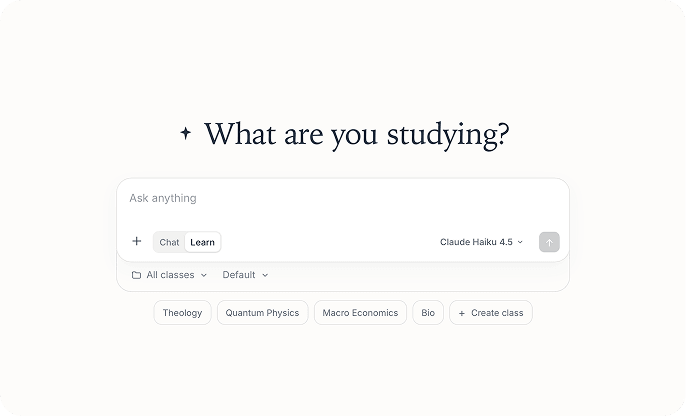












Kids should be exploring, but AI is getting in the way.
Childhood is for wandering, making things, and figuring them out. Now AI sits in the middle of it, answering in a calm, confident voice, as if it's simply telling the truth. It isn't. It repeats the values of whoever built it.
And most parents were never shown how to set any of this up. That's the gap we help with.
Meta's own rules allowed it.
Internal guidelines let its AI chatbots have "romantic or sensual" conversations with children. Meta said it removed that language after Reuters asked.
An AI built for teens.
Catholic teaching, real help with schoolwork, and limits that hold.
Learn mode helps your teen think, not just finish.
Learn mode works like a tutor. It asks questions, points out what's working, and shows where an argument is thin. Your teen writes the essay. Acutis helps them get better at it.
- Asks guiding questions before offering answers.
- Explains why, with sources you can check.
- Built for essays, study help, and practice.
Animation: a student's weak essay sentence gets a guiding question from the tutor, the student answers in their own words, and the sentence is rewritten as the student's own idea.
Answers rooted in what the Church actually teaches.
Acutis doesn't guess at Catholic teaching. It draws on the Catechism, the Summa Theologica, and other Church sources, and shows where an answer comes from so you and your teen can check it.
- Every teaching answer points to its source.
- Speaks Church teaching plainly, not as one opinion among many.
- Still helps with homework, sports, and coding without adding religion.
Animation: a teen asks why human life is sacred, the answer cites Catechism paragraph 2258, and a source panel shows the exact words of that paragraph.
Clear limits, set before your teen types a word.
Acutis has guardrails built in, and you add your own on top. Sensitive topics are handled with care, and you hear about it when it matters.
- Declines explicit and sexual content.
- Responds with care to self-harm, and alerts you.
- Flags substance use.
- You set daily limits and downtime.
Animation: a flagged teen message is hidden, Acutis replies kindly and points to a trusted adult, and a parent receives a sensitive topic alert on their phone.
You set the rules.
Five controls, all in your parent account. Change them any time.
See what your teen is asking.
Turn on chat history and your teen's conversations from that moment on appear in your parent view. Read along when you want to, and step back when you don't.
Your teen sees a notice that their family admin can view their chats.
Animation: in the parent view, a list of a teen's saved chats opens one conversation into a transcript, then refreshes to show a new chat.
Hear about it when it matters.
Turn on parental alerts and Acutis flags chats that touch on serious topics, such as self-harm, pornography and other sexual content, drugs, and violence. Acutis answers your teen with care first, then notifies you on your phone.
Alerts arrive as a push notification and are saved in your parent view.
Animation: a parent switches on parental alerts. Later a teen's flagged message is hidden, Acutis replies with care, and the parent's phone shows an Acutis Family Alert notification.
Set a daily limit.
Pick how many minutes your teen can use Acutis each day. It only counts while Acutis is open and active. When time is up, your teen sees a lock screen until tomorrow.
Set it to 0 for no limit.
Animation: a parent changes the daily limit in minutes, then the teen's screen shows a message that the daily limit has been reached.
Protect homework, dinner, and sleep.
Choose the hours when Acutis is off, with a schedule for each day of the week. Overnight ranges work too. Your teen sees a quiet screen instead.
Animation: a parent sets downtime from 9:00 PM to 7:00 AM, then the teen's screen shows a quiet time-to-rest message.
Block the topics you'd rather handle yourself.
For a supervised teen, pick topics Acutis won't discuss, such as dating, drugs and alcohol, or politics. Acutis stops early and points your teen to a parent, mentor, or spiritual director.
Blocked topics isn't perfect, so keep reviewing chat history.
Animation: a parent switches on blocked topics and picks categories, then a teen's message on a blocked topic is hidden and Acutis replies that the topic was blocked by the account admin.

Want help setting these up? Book a family call.
Let's talk.
One hour on video with someone from our team. We build a plan around your family: the right protections on every device, the AI you don't want blocked, and a way to help your kids grow up without AI getting in the way. $90, with a full refund if you're not happy.
Book a family call


Guides for parents.
Plain-language guidance for life with AI at home.
 Your Child Will Use AI This School Year. Here's How to Prepare.What kids are actually using AI for, the risks worth knowing, and a one-page family plan you can set up in twenty minutes.Read the guide
 AI Companies Have a Political Agenda. They're Pushing It on Your Kids.A widely-shared Washington Post analysis found most AI chatbots argue only one political side. We ran the same 30 questions through Acutis and audited every answer.Read the guide
Frequently asked questions
Will I be able to read my teen’s chats?
Yes, if you turn on chat history. You can read their conversations from that moment on, and your teen sees a notice that you can. You also have the option to get notified if they ask about sensitive topics.
Can you remove ChatGPT, Gemini, and other AI from our devices?
If you book a call with us, we help you delete AI apps, block AI websites, and turn off built-in AI assistants on each device you bring to the call, and we show you where each device keeps its own settings.
How do you block sites like ChatGPT and Character.AI?
In Chrome, we install Acutis Safe Search. It blocks a built-in list of AI chat, companion, and image sites, including ChatGPT, Gemini, Claude, Character.AI, and Replika. You can add your own sites to the list, or allow ones you trust.
How do you keep Gemini and AI answers out of Google search?
In Chrome, Google shows standard web results without AI Overviews or AI Mode, the AI Mode button is hidden, and Gemini’s website is blocked. You can also hide the Images tab if you want.
Does the blocking work in Safari or on a phone?
Browser protection works in Chrome, one profile at a time. In other browsers and on phones and consoles, we use Acutis parental controls and each device’s own settings, and we’re upfront about what can and can’t be blocked.
What if my teen removes the extension?
We can help you set up a Chrome profile for your teen that you manage, so only you can add or remove extensions. On a regular Chrome profile, you can be alerted if the extension is disconnected.
What happens if my teen asks about something serious, like self-harm?
We’ve worked with psychologists and priests to ensure that Acutis answers those types of questions with care. If you’ve turned on parental alerts, you will get a push notification on your phone and the chat is saved in your parent view. Alerts cover topics like self-harm, pornography and other sexual content, drugs, and violence.
How do daily limits and downtime work?
You set a daily limit in minutes and downtime hours for each day of the week. When time is up or downtime starts, your teen sees a quiet lock screen until it ends.
Do we need a paid plan, and what does the call cost?
The call is $90 for 60 minutes. Browser protection is part of Acutis’s paid plans. Acutis has a free plan and a 15-day free trial on paid plans, and we’ll tell you what you need before the call.
What if we’re not happy with the call?
Tell us by the end of the call and we’ll refund every dollar.